
Best Chrome Extensions for Online Shopping in 2026
Online shopping has never been easier.
But despite having thousands of stores at our fingertips, most shoppers still end up paying more than necessary. They forget to look for coupon codes, miss cashback opportunities, or buy products right before a price drop.
The good news?
You don't have to spend hours searching for discounts manually.
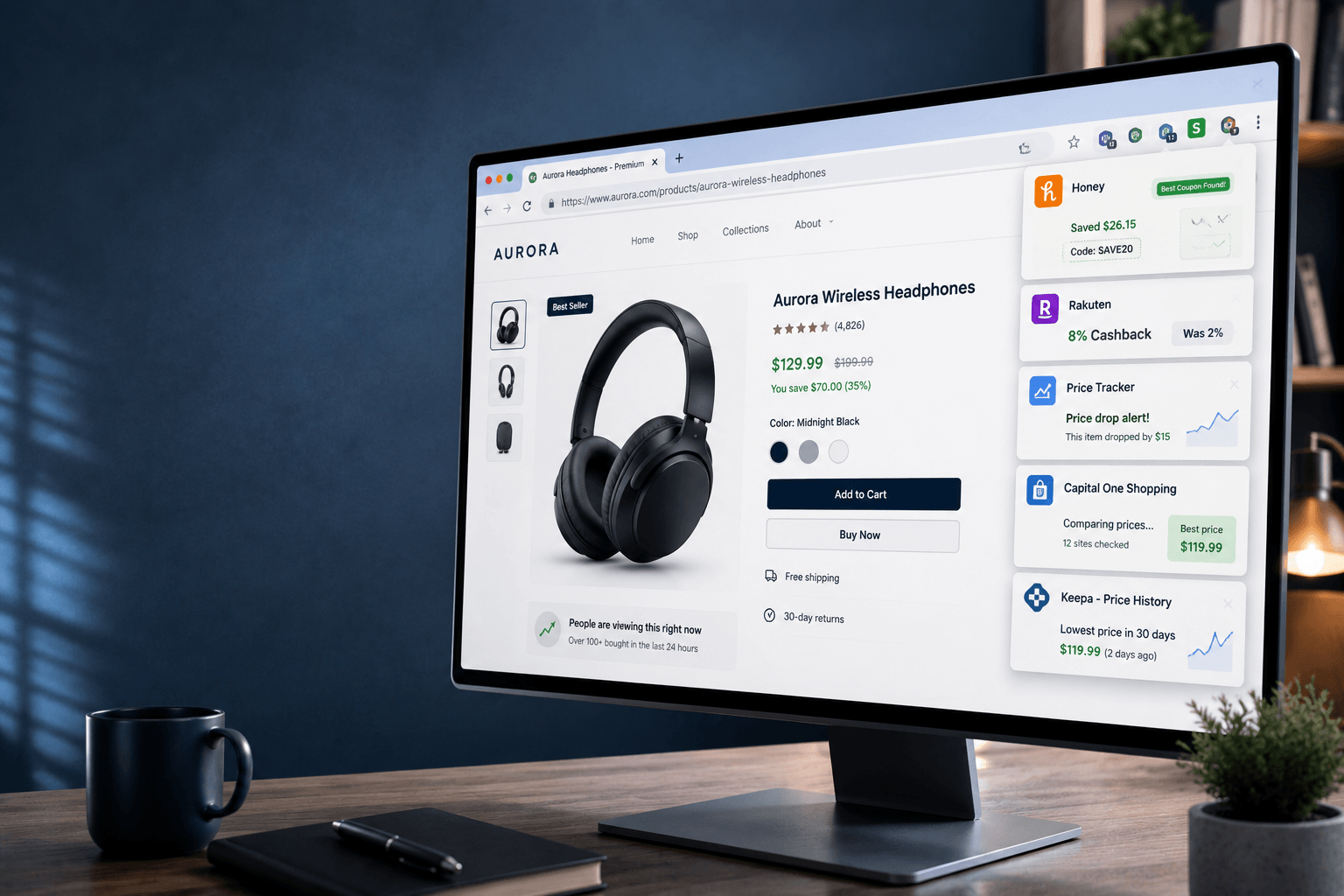
Modern Chrome extensions can automatically find promo codes, track price changes, compare products, and even alert you when better deals become available.
If you're looking to save money on every online purchase, these are some of the best Chrome extensions worth installing in 2026.
Why Use Shopping Extensions?
Most shoppers already use Google Chrome daily.
Shopping extensions add useful features directly into your browser, helping you:
- Find coupon codes automatically
- Track product prices
- Earn cashback rewards
- Compare prices across stores
- Discover hidden discounts
- Avoid overpaying
Instead of manually checking multiple websites, these tools do the work for you.
Honey
Honey remains one of the most popular shopping extensions available.
Its biggest advantage is simplicity.
When you reach the checkout page, Honey automatically searches and tests available coupon codes.
Key Features
- Automatic coupon application
- Rewards program
- Price tracking
- Deal notifications
- Amazon price comparisons
Best For
Shoppers who want an easy, hands-off way to find promo codes.
Pros
- Simple to use
- Large coupon database
- Works with thousands of stores
Cons
- Not every code works
- Cashback options vary by retailer
Rakuten
Rakuten focuses primarily on cashback rather than coupon codes.
Instead of reducing the price immediately, Rakuten rewards shoppers after purchases are completed.
Key Features
- Cashback earnings
- Promotional bonuses
- Coupon code integration
- Thousands of participating retailers
Best For
People who shop online frequently and want long-term savings.
Pros
- Reliable cashback system
- Large retailer network
- Easy setup
Cons
- Cashback takes time to process
- Not available at every store
Capital One Shopping
Capital One Shopping has become one of the strongest shopping tools available.
Unlike many coupon extensions, it focuses heavily on price comparisons.
Key Features
- Automatic coupon testing
- Price tracking
- Alternative retailer suggestions
- Product comparison tools
Best For
Finding lower prices across multiple stores.
Pros
- Excellent price comparison features
- Easy-to-understand interface
- Helpful deal recommendations
Cons
- Shopping credits instead of direct cashback
- Some recommendations can feel repetitive
CamelCamelCamel
Amazon shoppers love this tool.
CamelCamelCamel focuses specifically on tracking Amazon product prices.
Key Features
- Historical price charts
- Price drop alerts
- Product tracking
- Wishlist monitoring
Best For
Amazon shoppers looking to avoid fake discounts.
Why It Matters
Many products appear discounted even when they recently sold for the same price.
Price history helps you determine whether a deal is actually a deal.
Keepa
Keepa is another powerful Amazon-focused extension.
Many shoppers consider it essential.
Key Features
- Detailed price history
- Sales rank tracking
- Inventory monitoring
- Deal alerts
Best For
Advanced Amazon shoppers who want detailed product insights.
Pros
- Extremely detailed data
- Excellent tracking capabilities
- Accurate pricing information
Cons
- More complex than beginner-friendly tools
Slickdeals Browser Extension
Slickdeals is one of the largest deal-sharing communities online.
Its extension helps shoppers discover popular promotions while browsing.
Key Features
- Community-voted deals
- Price alerts
- Coupon notifications
- Trending offers
Best For
Finding exceptional deals discovered by other shoppers.
Pros
- Strong community verification
- High-quality deals
- Frequent updates
Cons
- Large volume of notifications if not customized
InvisibleHand
InvisibleHand helps shoppers compare prices automatically.
When browsing products, it searches for lower prices available elsewhere.
Key Features
- Price comparison
- Travel deal tracking
- Product monitoring
- Retailer comparisons
Best For
People who frequently comparison shop.
Pros
- Works quietly in the background
- Easy to use
- Helps identify lower prices quickly
Cons
- Smaller retailer network compared to larger competitors
Fakespot
Finding a great deal means little if the product reviews are fake.
That's where Fakespot becomes useful.
Key Features
- Review analysis
- Seller trust ratings
- Fake review detection
- Marketplace insights
Best For
Amazon shoppers and marketplace buyers.
Why It Matters
Fake reviews can make poor products appear trustworthy.
Fakespot helps identify products with suspicious review patterns.
RetailMeNot Deal Finder
RetailMeNot has been a major coupon source for years.
Its extension simplifies the process of finding available discounts.
Key Features
- Coupon alerts
- Cashback opportunities
- Deal notifications
- Automatic savings suggestions
Best For
General online shopping across multiple categories.
Pros
- Easy to use
- Large retailer coverage
- Frequent updates
Cons
- Some coupon availability overlaps with other tools
Karma
Previously known as Shoptagr, Karma focuses on price tracking and shopping alerts.
Key Features
- Price drop notifications
- Wishlist tracking
- Back-in-stock alerts
- Product monitoring
Best For
Shoppers willing to wait for the best possible price.
Pros
- Great for long-term savings
- Helpful notification system
- Supports many retailers
Cons
- Less focused on coupon codes
Which Shopping Extension Is Best?
The answer depends on your shopping habits.
For Coupon Codes
- Honey
- RetailMeNot
- Capital One Shopping
For Cashback
- Rakuten
For Amazon Shopping
- Keepa
- CamelCamelCamel
For Price Tracking
- Karma
- Keepa
For Product Reviews
- Fakespot
For Deal Discovery
- Slickdeals
Many experienced shoppers use several extensions together.
Each tool solves a different problem.
Can You Use Multiple Extensions at Once?
Yes.
Many shoppers combine:
- A coupon extension
- A cashback extension
- A price tracker
For example:
You might use:
- Honey for coupon codes
- Rakuten for cashback
- Keepa for Amazon price tracking
This combination maximizes savings without much effort.
Common Mistakes When Using Shopping Extensions
Even the best tools have limitations.
Relying Only on One Extension
No extension finds every available deal.
Checking multiple sources often leads to better savings.
Ignoring Cashback Opportunities
Many shoppers focus exclusively on coupons and overlook cashback rewards.
Buying Immediately
Price trackers work best when you give them time.
Waiting a few days can sometimes save significantly more.
Forgetting to Compare Prices
A coupon code doesn't always mean you're getting the lowest price.
Always compare total costs.
How to Build the Ultimate Savings Setup
If you're serious about saving money online, consider this setup:
Essential Extensions
- Honey
- Rakuten
- Keepa
- Fakespot
Optional Additions
- Capital One Shopping
- Karma
- Slickdeals
Together, these tools cover:
- Coupons
- Cashback
- Price tracking
- Product reviews
- Deal alerts
That's everything most shoppers need.
Final Thoughts
Online shopping extensions have become one of the easiest ways to save money in 2026.
Instead of manually searching for discounts, these tools can:
- Apply coupon codes automatically
- Alert you to price drops
- Earn cashback rewards
- Compare prices
- Verify product reviews
While no extension is perfect, using the right combination can significantly reduce your shopping costs throughout the year.
Before your next purchase, Browse verified coupon codes, Check our latest deals, and Explore current discounts to make sure you're getting the best possible value.